



Templates & fields
Card appearance
In the card and board views (see List view) as well as the task card view, each checklist can show up to three additional fields and a person field for avatars. This configuration can be set at two levels:
- Per template, in the template wizard under the «Metadata» step — takes precedence once it's set.
- Globally, under Settings → «Appearance» — acts as a fallback for templates that don't have their own configuration, for all users of this checklist management.
Global setting
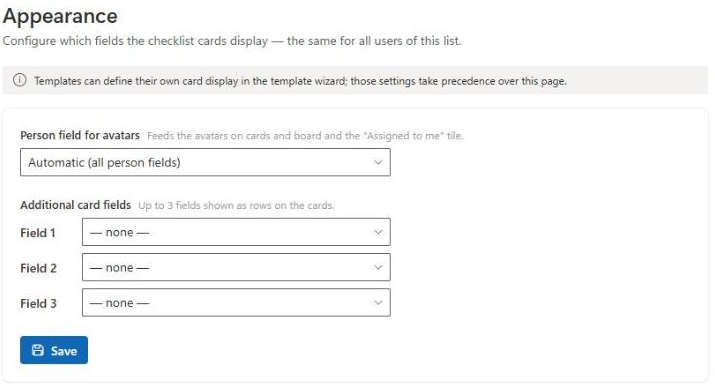
Open the settings and switch to «Appearance»:
- Person field for avatars — which person field feeds the avatars on cards and the board, as well as the «Assigned to me» statistics tile. Default: automatic (all person fields).
- Additional card fields — up to three fields shown as rows on the cards.
Warning
The global appearance setting requires the «sfclDisplayConfig» field. If it isn't provisioned on the site yet, saving will fail. In that case, run «Update» once under Settings → «Setup» and save again — see Setup & update.
How this interacts with templates
If a template defines its own card fields or its own person field in the wizard, those apply to every checklist based on it — regardless of the global setting. If a template leaves these options empty, the global setting is used as a fallback.
We use cookies to continuously improve our website and service. Privacy policy